
Smart Solutions, Safer Communities
Modbus Alarms to PTZ Camera Presets Across Two Plant Networks in Abu Dhabi

Industrial controllers often know about a problem before anyone sees it. In this recent project, Transit, as system integrator, turned Modbus values from an industrial plant in Abu Dhabi into automatic PTZ camera moves. Transit delivered the hardware, cameras, integration and commissioning, with the software developed by our software integration partner Abaci to Transit's specification. Plant controllers push status values into the system. When a value meets a rule, a PTZ camera turns to a saved view, and staff manage everything from a web console.
The Challenge
- The plant pushes, it doesn't wait to be asked – controllers write values when something changes, so the system had to receive those writes rather than poll for them all day.
- Two separate plant networks – one installation had to receive from both at the same time, on two different network addresses.
- Mixed data types – values arrive as on/off signals, whole numbers and decimal numbers, and sometimes a single bit inside a larger number is the alarm.
- Camera discipline – several alarms must not fight over one camera, and an operator using the joystick must not be overridden mid-move.
- No developers needed – staff had to add machines, map addresses, set comparisons and check whether a camera call succeeded on their own.
What We Delivered
- Hardware, cameras, integration and commissioning – Transit, as system integrator, supplied the hardware and PTZ cameras, integrated the system with both plant networks and commissioned it. The software was developed by our software integration partner Abaci to Transit's specification.
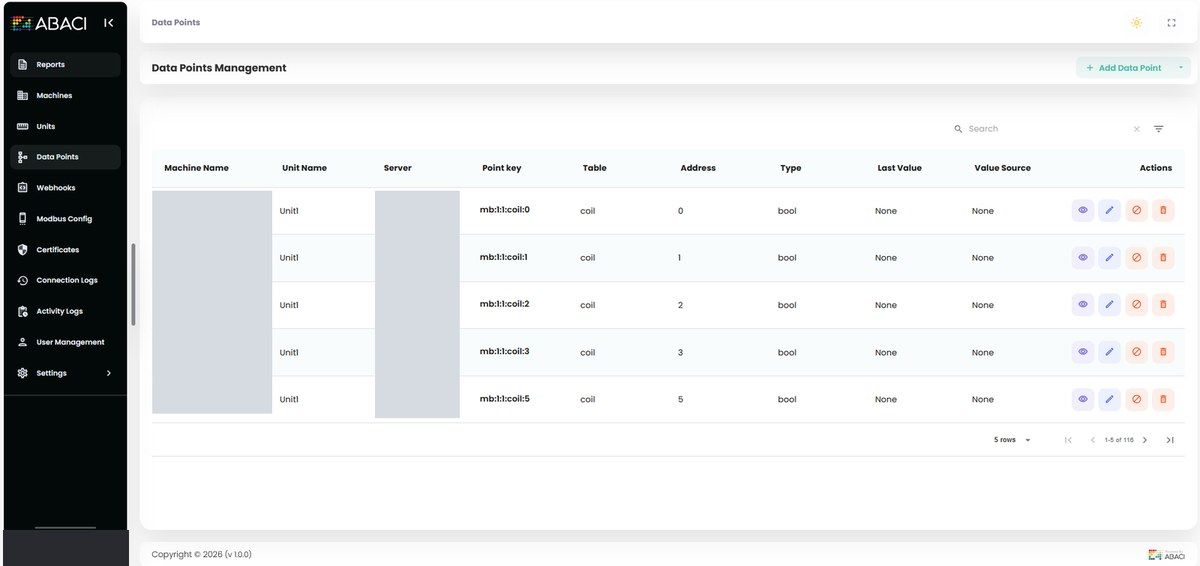
- Data points – each point records the machine, measurement type, plant network, address, data type and, where needed, the word order for 32-bit values or which bit inside a word is the alarm.
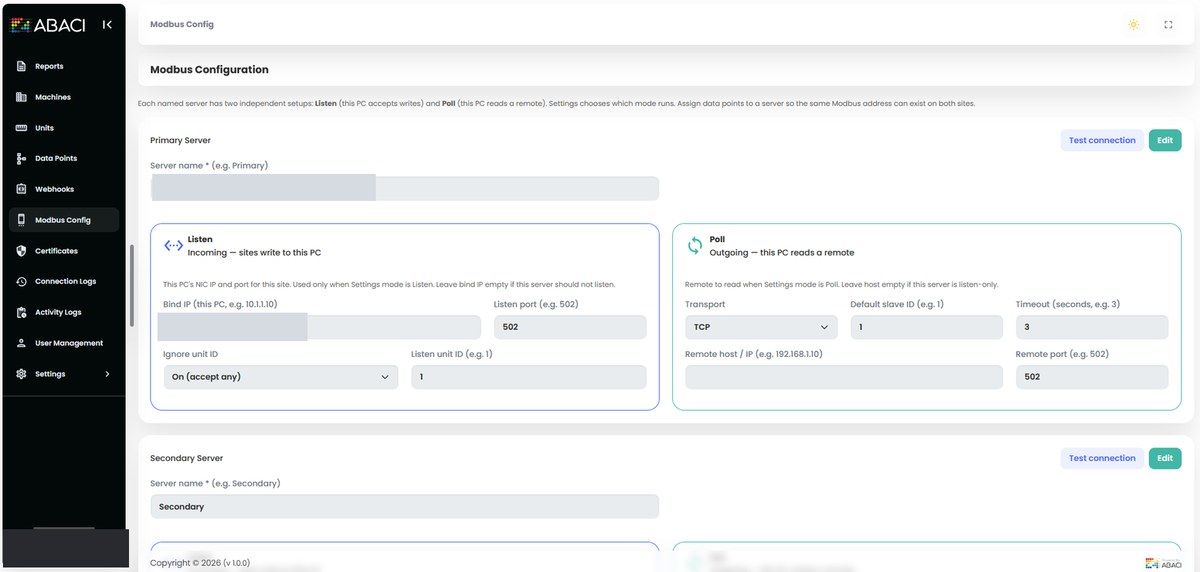
- Receive mode (Listen) – the system runs a Modbus TCP service and waits. Plant controllers write values in, and the system decodes them, stores them and applies the rules. This is how the site runs day to day.
- Ask mode (Poll) – the system can also read a list of addresses from a remote device on a timer, grouping neighbouring addresses to keep network traffic low. It's ready if a network needs it later.
- Two plant networks at once – each network has its own Listen address and port, and both run at the same time.
- Device identity – a Listen endpoint can accept writes from any device identity or require a specific one.
- Rules staff can edit – send a camera call on every change or only when a comparison is true, naming the camera and saved view in the outgoing message.
- Camera console – a camera list with reachability checks, saved views (presets), an on-screen joystick, a per-camera move queue, and live status and history.
- Practical tools – spreadsheet loading, safe delete, activity history, a connection test and a licence locked to the machine. Both applications install on a Linux machine with a database and a job queue.
How a Plant Write Becomes a Camera Move
- Controllers on either plant network write a value to the system's Listen endpoint.
- The value is decoded using the data point's address, type, word order and bit position.
- If the value hasn't changed, nothing happens. Repeated writes of the same value are ignored.
- A real change is checked against the rules, and a camera call names the camera and saved view.
- The request joins that camera's waiting line, and the camera finishes one move before starting the next.
- If an operator is using the joystick, automatic moves wait until they stop. Every move is logged.
Problems Solved Along the Way
- Responsive screens – handling each write inside the network thread froze the web screens. Decoding, saving and rule checks now run on a background worker pool, and the network thread answers immediately.
- No false alarms from rewrites – controllers often rewrite the same values. Unchanged values are ignored, and after a restart the Listen endpoints start from the last known values, so a rewrite isn't mistaken for a new alarm.
- Correct values – decimal numbers and packed on/off alarms were wrong when treated as simple 16-bit values. Each point now declares its type, word order and alarm bit.
- Steady cameras – rules fire when a condition becomes true, or after a hold time on a lasting condition. "Every change" has to be chosen on purpose.
- Safe firmware updates – a controller firmware update can move addresses and quietly break the map. A connection test reads the configured points, and a spreadsheet upload can replace a map without retyping it.
The Result
Two plant networks can send values at the same time. Only a real change can move a camera, camera requests wait in line, and the operator at the joystick keeps control until they stop. Automatic and manual moves share one history log.
Where This Fits
As a system integrator, Transit links CCTV systems with IoT and industrial data, so cameras respond to what is happening in the process. See also our related projects: OPC UA alarms to PTZ camera presets and OPC UA energy and gas data reporting.
Frequently Asked Questions
What is Modbus? Modbus is a widely used industrial protocol. Controllers and instruments use it to exchange numbers and on/off signals over the network.
Does the system have to poll the plant all the time? No. On this site, the plant controllers write values into the system (Listen). Polling is available on the same screen if a network needs it later.
What stops a repeated value from moving the camera again? Unchanged values are ignored, so only a real change can trigger a camera move.
Talk to Our Team
Want to connect PLCs, controllers or alarms to your cameras? Our team in the UAE can help.
Email sales@transit-si.com, call 02 553 8502, or contact us to discuss your project.
About the Author

Share this article
Connect With Us
Our Office Locations
Abu Dhabi
Head Office
Dubai
Branch Office
India
Branch Office - Calicut