
Smart Solutions, Safer Communities
OPC UA Alarms to PTZ Camera Presets for an Industrial Plant in Abu Dhabi

When a plant reading stays outside its limit, someone needs eyes on that equipment straight away. In this recent project, Transit, as system integrator, linked the OPC UA readings of an industrial plant in Abu Dhabi to its PTZ cameras. Transit delivered the hardware, cameras, integration and commissioning, with the software developed by our software integration partner Abaci to Transit's specification. When a chosen reading meets a rule for long enough, a camera automatically turns to a saved view of the right equipment, and every move is logged. No one has to watch every value on a screen all day.
The Challenge
The plant already published live readings over OPC UA and already had PTZ cameras, but nothing linked a process condition to a camera view. The solution had to deal with a few practical problems:
- Noisy values – a reading bouncing around a limit would keep swinging the camera if every small change triggered a move.
- Competing alarms – several alarms can ask for the same camera within seconds, and two moves at once leave the camera stuck between two views.
- Hands-on operators – staff still needed to drive a camera by hand and save the view they had just framed.
- On-site operation – everything had to run on site, with its own databases and web screens.
What We Delivered
- Hardware, cameras, integration and commissioning – Transit, as system integrator, supplied the hardware and PTZ cameras, integrated the system with the plant and commissioned it. The software was developed by our software integration partner Abaci to Transit's specification.
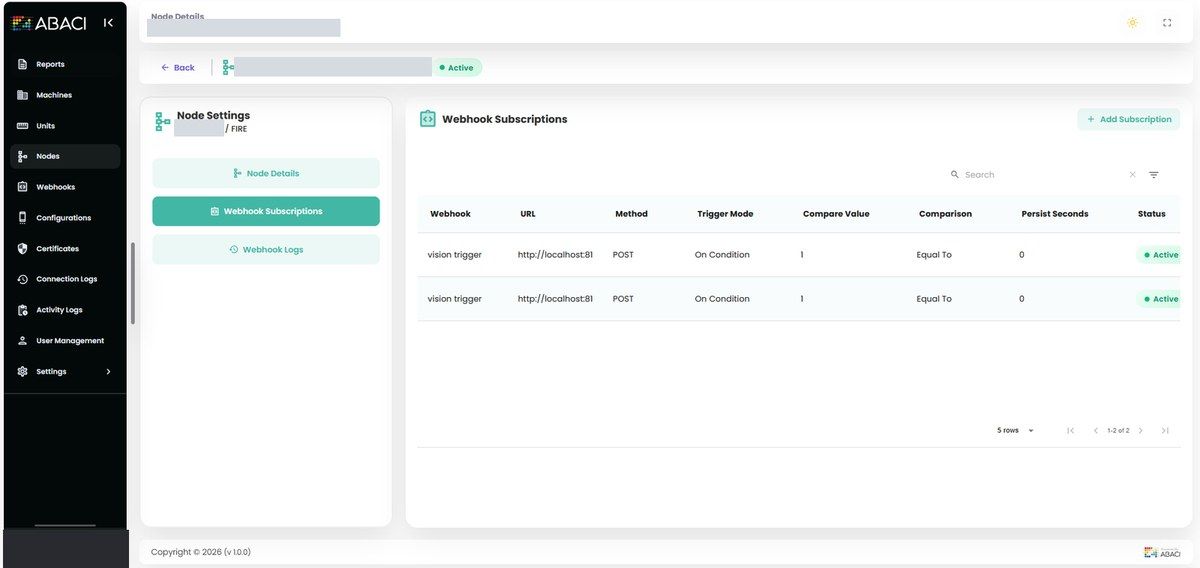
- Plant rules console – machines, measurement types and the OPC UA address of each reading, with bulk loading from a spreadsheet. Each reading can be listened to live (Subscribe), checked on a timer (Poll), or both.
- Main and backup plant servers – if the main server returns blanks or errors for some readings, those readings are requested from the backup server.
- Rules staff can edit – send a camera call on every change, or only when a comparison is true (for example, greater than 85). The comparisons on offer depend on whether the value is a number, yes/no or text.
- Hold time – on the live path, a condition must stay true for a set number of seconds before one camera call is sent, so brief spikes don't move the camera.
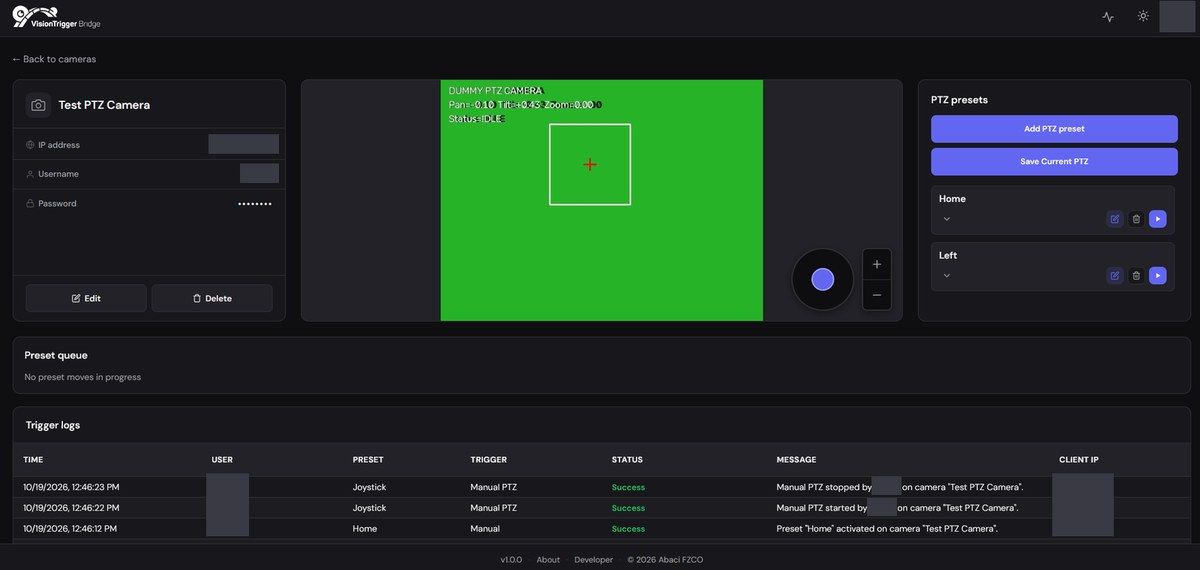
- Camera console – a camera list with online/offline status, named saved views (presets), an on-screen joystick for pan, tilt and zoom, and live status of the move queue and history.
- Testing and audit trail – staff can fire a rule with test values to confirm the camera moves, and every outbound call and every edit is recorded.
- Secure on-site installation – user sign-in with tokens, certificate-secured plant connections, and both applications installed side by side as Linux packages, each licensed to its machine.
How an Alarm Becomes a Camera Move
- The plant's OPC UA servers publish readings, and more than a thousand are listened to live.
- A rule checks each new value. On the live path, the condition must hold for the set time before anything happens.
- The camera call names a camera and a saved view.
- The request joins that camera's waiting line. The camera finishes one move and reports that it is still before starting the next.
- If an operator is using the joystick, automatic moves for that camera wait until the operator stops.
- Every move is logged: who or what asked for it, which preset, and whether it worked.
Built for Reliability
Several problems came up during the project, and each was solved in the system itself:
- Automatic recovery – live listening used to stop after a plant-server restart or a short network break. It now retries with longer waits, watches the connection and rebuilds itself on a timer (every five minutes by default).
- No missed changes – when listening is rebuilt for more than a thousand readings, the new session starts first and the old one closes only once the new one is working.
- Speed at scale – rules are kept in memory instead of being looked up in the database for every change.
- Offline cameras – a quick network check marks each camera online or offline, and offline cameras are skipped until they answer again.
- Clear history – automatic and manual moves are recorded as different types, so a bad preset is easy to trace.
The Result
A brief spike doesn't move the camera. A condition that stays true does, once. Later requests wait their turn, the operator at the joystick keeps control until they stop, and automatic and manual moves share one history log.
Where This Fits
As a system integrator, Transit connects security systems with the operational data around them. This project brings together CCTV systems and IoT and industrial data, so the camera points where the process needs attention. Related projects: Modbus alarms to PTZ camera presets across two plant networks and OPC UA energy and gas data reporting.
Frequently Asked Questions
What is OPC UA? OPC UA is a common industrial protocol. Plant equipment uses it to publish live readings, such as temperatures, alarms and levels, over the network.
Can operators still control the camera by hand? Yes. While someone uses the on-screen joystick, automatic moves for that camera wait, and they resume after the operator stops.
What happens if the main plant server misses some readings? Those readings are requested from the backup plant server instead.
Talk to Our Team
Want to link plant alarms, sensors or other systems to your cameras? Our team in the UAE can help.
Email sales@transit-si.com, call 02 553 8502, or contact us to discuss your project.
About the Author

Share this article
Connect With Us
Our Office Locations
Abu Dhabi
Head Office
Dubai
Branch Office
India
Branch Office - Calicut