
Smart Solutions, Safer Communities
OPC UA Energy and Gas Data Reporting for Dashboards in the UAE
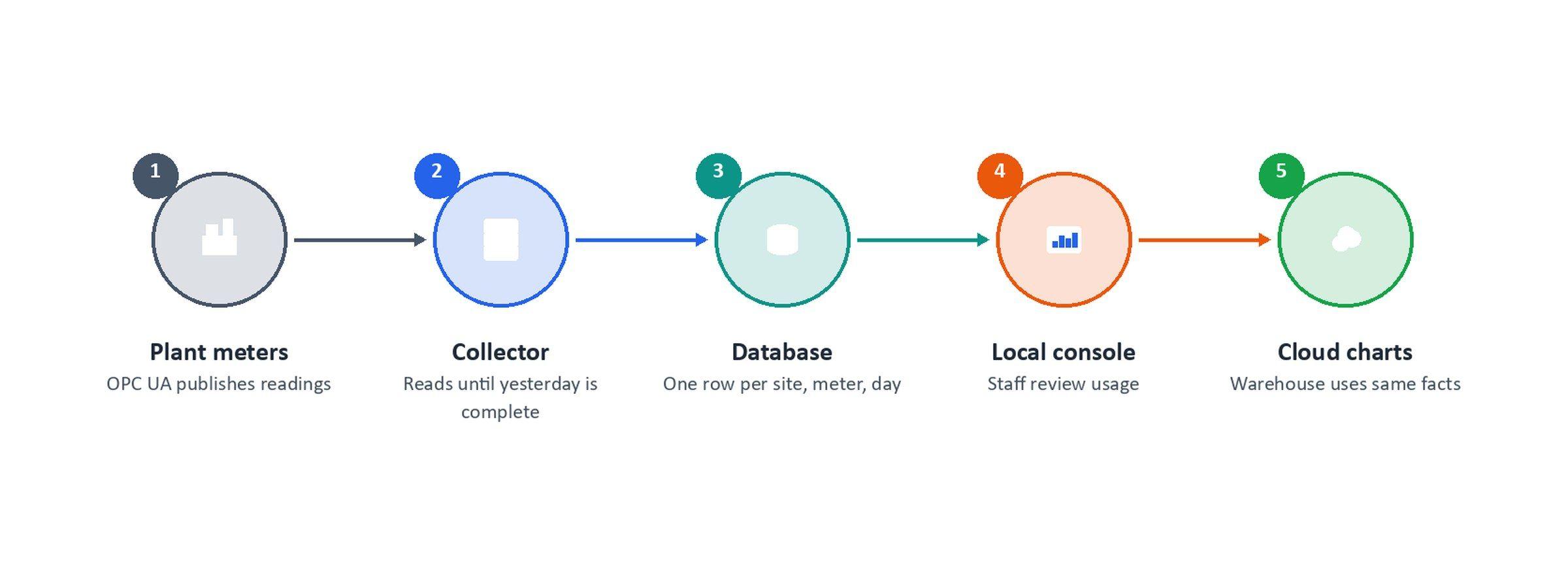
Plant meters were already publishing readings, but reports need more than live numbers: they need a complete, correctly dated daily record. In this recent project in the UAE, Transit, as system integrator, set up the collection of a full day of energy (MMBTU) and gas volume (MMSCF) readings over OPC UA into PostgreSQL. Another team's Snowflake dashboards then read that database directly. Transit delivered the hardware, integration and commissioning, with the software developed by our software integration partner Abaci to Transit's specification.
The Challenge
- Readings without a reliable daily record – the readings already existed on the plant servers. What was missing was a complete, dated daily table that reports could trust.
- A simple admin screen – staff needed to set up connections, check that last night's run worked and browse usage. They didn't need a live plant-control display.
- The right business day – the site uses the UAE calendar, and a reading collected during a UAE day belongs to the previous business day, so charts had to match how the plant reports usage.
- Ready for another team's dashboards – a separate team connects Snowflake to the PostgreSQL database. The data had to arrive complete and clean so their dashboards could use it as it is.
What We Delivered
- Hardware, integration and commissioning – Transit, as system integrator, supplied the hardware, integrated the system with the plant servers and commissioned it. The software was developed by our software integration partner Abaci to Transit's specification.
- Sites and meter types – each site is paired with the units being measured (P-D-MMBTU for energy and P-D-MMSCF for volume), and each active pair points to one address on the plant server.
- Server settings and certificates – staff enter the plant server address, login and connection security, and can set a backup server. The console creates the security certificate the plant server expects and shows when it needs renewing.
- Scheduled collection – a background job reads the mapped addresses, fills gaps from the backup server when needed, and saves the batch.
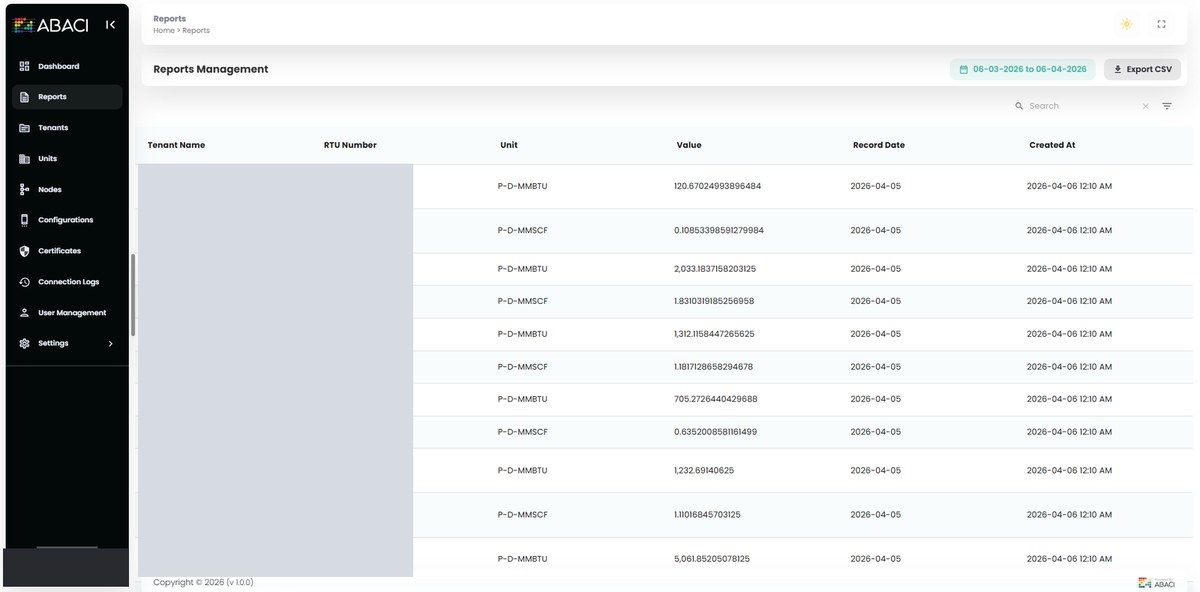
- A clean daily table – each row holds the value, when the plant recorded it, when it was collected, the business date, the site and the unit.
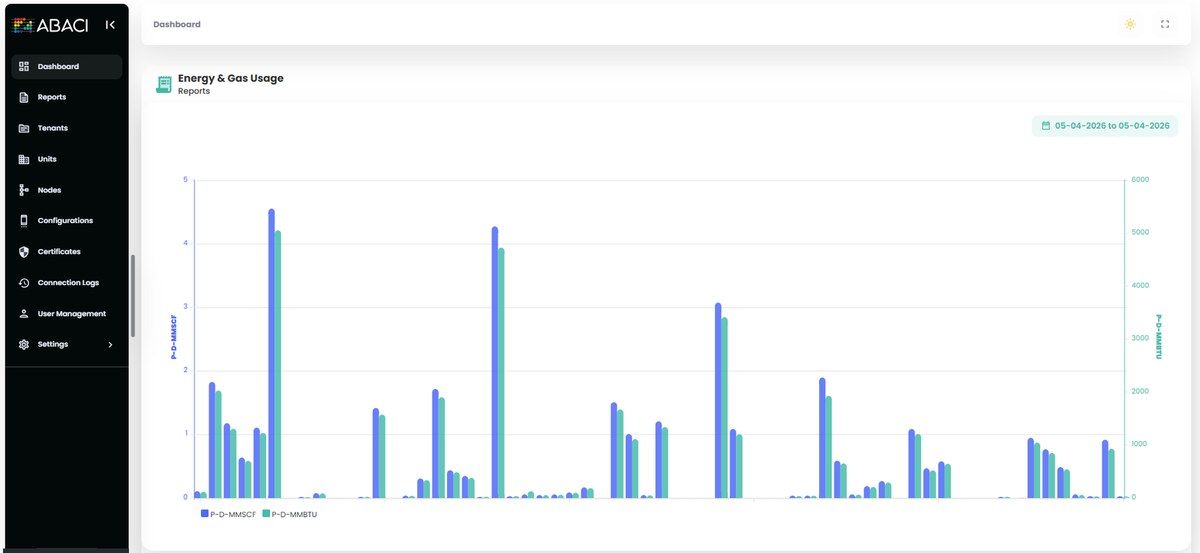
- On-screen usage – daily and monthly totals for energy and volume, filtered by site, unit and year, plus reports with CSV export.
- Connection history – every attempt is logged as a success, a skip (the day was already complete) or a failure with a clear reason.
- Licence check and containers – collection only runs with a valid licence, and the stack runs in containers: database, job queue, API, scheduler and web console.
How a Day of Data Is Collected
- The job runs about every 10 minutes through the day, avoiding the exact midnight boundary.
- The business date is "yesterday" in UAE time, and it is stored on every row so reports can filter by day quickly.
- A day only counts as complete when every active site-and-meter pair has a real number. Blank values don't count.
- If anything is missing, the incomplete day is cleared and read again in full, so a half-written day is never left for the dashboards.
- Once a day is complete, later runs log a skip and write nothing, so no duplicate rows appear.
- Readings the main plant server doesn't return are requested from the backup server, and the results are merged.
Problems Solved Along the Way
- Totals in the wrong day – using the collection time put every daily and monthly total in the wrong bucket. Every row now carries the business date, and all reports use it.
- Gaps after one overnight read – a timeout or blank values used to leave holes. The job now keeps checking through the day and re-reads the whole day if any meter is missing.
- Duplicates on retry – retrying a completed day would have created duplicate rows in the database and the dashboards. Completed days are now skipped.
- Secure connection set-up – the first encrypted connection failed until trust was set up. The console now creates the client certificate and clearly says when a change needs a new one.
- Invisible failures – a skipped or failed run used to be visible only in a server log. Connection history now shows it on screen.
The Result
Staff can see whether yesterday's data is complete without opening the database. Anyone reading the PostgreSQL table, including the Snowflake dashboards, gets one clear shape of data: site, meter type, business date, value and the plant's own timestamp. The dashboard team connected straight to PostgreSQL with the credentials we provided, without having to work out business dates or remove duplicate retries.
Where This Fits
Transit is a system integrator. Alongside security and ELV systems, we deliver IoT and industrial data solutions that turn plant readings into reliable information for operations and management. See also our related projects: OPC UA alarms to PTZ camera presets and Modbus alarms to PTZ camera presets.
Frequently Asked Questions
What are MMBTU and MMSCF? MMBTU (million British thermal units) measures energy, and MMSCF (million standard cubic feet) measures gas volume. These were the two units tracked in this project.
Did this project build the Snowflake dashboards? No. Another team built the dashboards. This project delivered complete, clean daily data in PostgreSQL for those dashboards to read directly.
What happens if the plant server misses some readings? The missing readings are requested from the backup server. If the day is still incomplete, it is cleared and read again until every active meter has a real value.
Talk to Our Team
Need plant or meter data collected reliably for reporting? Our team in the UAE can help.
Email sales@transit-si.com, call 02 553 8502, or contact us to discuss your project.
About the Author

Share this article
Connect With Us
Our Office Locations
Abu Dhabi
Head Office
Dubai
Branch Office
India
Branch Office - Calicut